
BUILT AROUND YOU. BUILT TO GROW.
An Adaptable Multi-Channel Audio Ecosystem
Your living room does more than play movies. It is where you listen to music, stream shows, play games, and connect your computer.
NuPrime-X helps you build audio around that mix. Keep compatible stereo equipment, add immersive sound, or extend audio into other rooms with optional network components. Choose the configuration that fits today, with room to grow as your needs change.
Choose your starting point
01 / INTEGRATE
Keep what you love.
Add surround sound around your existing stereo system.
02 / PERSONALIZE
Build your way.
Choose processing, DACs, and amplification for your room.
03 / EXTEND
Go beyond one room.
Route audio over Ethernet to speakers or other rooms.
From your everyday sources to your speakers
Gaming console / Apple TV / HDMI computer
H16-AVP
Source selection • surround decoding • room calibration
Analog | AES3 digital | Optional AoIP network audio
Compatible DACs, amplifiers or powered speakers
Conceptual signal flow. Choose the outputs and receiving equipment for your configuration; a separate DAC is needed only where digital-to-analog conversion is not already included.
The H16-AVP brings HDMI sources into an immersive system, with Dolby Atmos decoding up to 7.1.4, DTS:X support and automatic room calibration. Analog and AES3 outputs offer different ways to connect your equipment; network audio requires the optional AoIP card.
Available audio formats depend on the content, app, source device and connection. Check your console, Apple TV or computer settings and the processor’s supported video modes when planning the signal path.
01 / INTEGRATE
Keep what you love.
Already enjoy your stereo system? Keep compatible equipment for the front left and right channels, and add the processing, amplification and speakers needed for surround sound.
Choose the connection that fits
- Analog stereo system: connect the H16-AVP’s front-channel analog outputs to a compatible preamp or amplifier. Use the remaining outputs for the center, surround and height channels in your chosen layout.
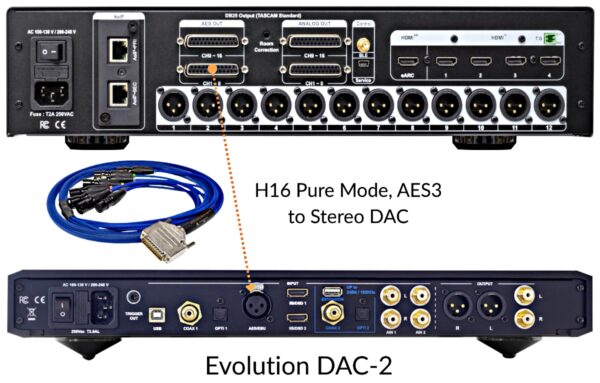
- Stereo system with an AES3-compatible DAC: send the front left and right channels digitally to your DAC, then to your stereo amplification. Check the DAC’s input format; a digital input alone does not establish AES3 compatibility.
What you need: H16-AVP, compatible front-channel equipment, suitable interconnects, and amplification and speakers for the channels you add. An AoIP card is not required for these analog or AES3 paths.
Plan the setup: establish a repeatable volume level for the stereo chain and calibrate all speakers together. Use a home-theater bypass input where supported, or follow your preamp’s integration instructions. Account for any additional DAC processing delay.
02 / PERSONALIZE
Build your way.
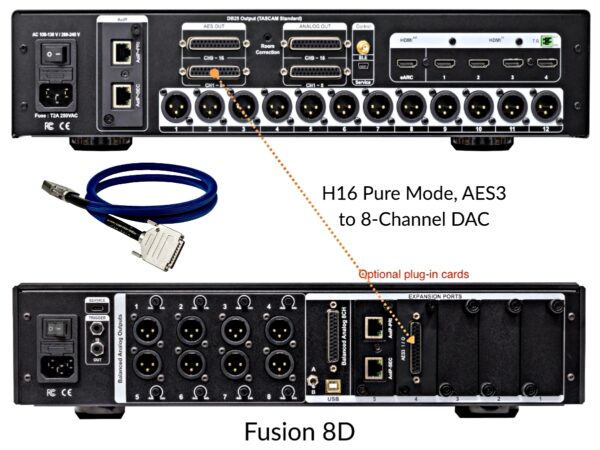
Choose separate processing, conversion and amplification to match your speakers, room and listening priorities. AES3 carries digital audio from the processor to compatible downstream equipment.
Separate DAC and power amplifiers
Connect the H16-AVP to a Fusion 8D multi-channel DAC using suitable AES3 cables, then connect the DAC’s analog outputs to your chosen power amplifiers and speakers. This lets you select amplification for each part of the system.
Digital input and amplification together
The MCX-800AD with the Card-AES-96A combines digital-to-analog conversion and eight channels of amplification. The H16-AVP performs surround-format decoding upstream.
What you need: H16-AVP, the selected DAC/amplifier configuration, compatible AES3 interconnects, speakers and a subwoofer as required by your layout.
Count every channel: an eight-channel DAC or amplifier does not cover an entire 7.1.4 system on its own. Plan additional conversion and amplification for the remaining channels, and a suitable subwoofer connection.
Place conversion closer to your speakers
For an immersive system with speakers spread around the room, optional Audio over IP (AoIP) components carry audio over Ethernet to compatible receivers. This can reduce long analog cable runs and give you more freedom to position equipment.
Example: an H16-AVP fitted with an AoIP card sends the seven ear-level channels and subwoofer feed to a Fusion 8D fitted with a compatible AoIP card. The DAC feeds Fusion-4X and Fusion-3X amplification plus the subwoofer. Four height channels travel to an AoANA-F04A near the height speakers.
The AoANA-F04A supplies line-level analog outputs. Use powered speakers or separate power amplifiers for passive speakers.
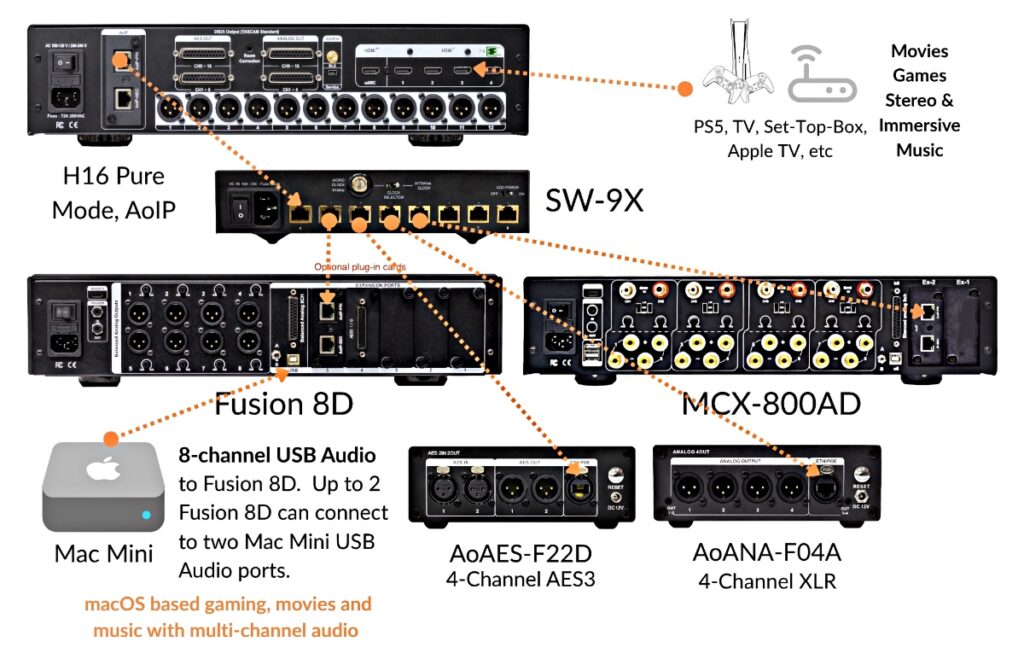
Additional equipment: compatible AoIP cards at the source and receiving DAC, an appropriately configured Ethernet switch, network cabling, and power or suitable PoE provision for the endpoints.
Expansion has limits: routing an existing channel to additional receivers does not create new independently decoded channels. The H16-AVP’s Dolby Atmos decoding remains limited to 7.1.4; network capacity and endpoint capabilities also determine the installation’s limits.
03 / EXTEND
Go beyond one room.
Use a compatible computer audio source and AoIP endpoints to send sound to other rooms. Convert the network audio near the destination, then connect to local amplification or powered speakers.
Computer + compatible audio software / virtual sound card
↓ Ethernet switch
Room A: AoANA-F04A → powered speakers or amplifier
Room B: AoAES-F22D → compatible DAC and audio system
- Analog destination: AoANA-F04A provides four channels of balanced analog output.
- Digital destination: AoAES-F22D provides AES3 outputs for compatible digital equipment.
What you need: compatible playback and network audio software, an Ethernet switch, receiving interfaces, local audio equipment and suitable cabling. PoE-capable endpoints require a compatible PoE switch or injector if powered over Ethernet; PoE powers the interface, not the connected passive speakers.
Plan the source as well as the network: a virtual sound card transports audio; it does not by itself decode Dolby Atmos or provide a 7.1.4 renderer. Playback format and channel count depend on the application, operating system, source content and hardware. Independent music in different rooms also requires a source and software capable of supplying the separate streams.
For HDMI movie and game sources, use the processor-based path above. For computer playback, consult the computer audio guide and confirm the intended configuration before choosing components.
Connections and setup details
Once you have chosen a system path, use this reference to plan the connections. Cable quantities depend on the channels and equipment you use.
Analog, AES3 or AoIP?
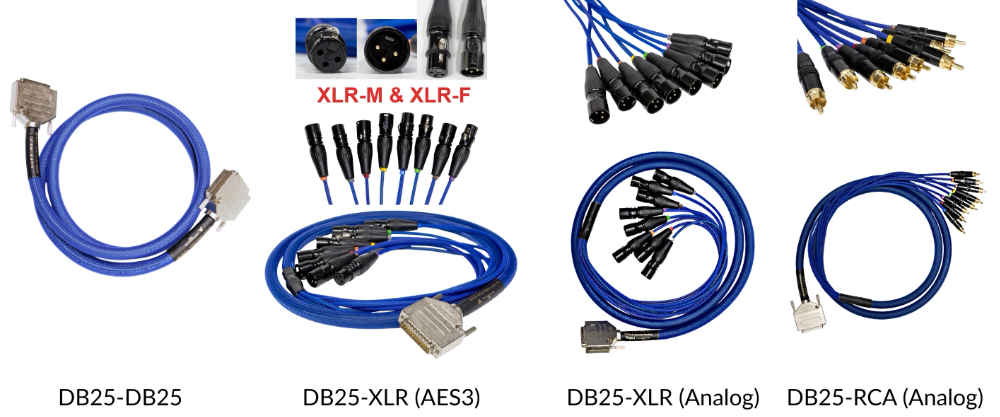
- Analog: connect to analog inputs on power amplifiers, preamps or powered speakers. Choose XLR or the appropriate analog DB25 breakout for your equipment.
- AES3: connect digitally to a compatible DAC or digital-input amplifier. Use an AES3 cable with the correct connector and channel pinout.
- AoIP: connect compatible network audio devices through Ethernet. Confirm the optional cards, supported protocols, sample rates and channel capacity at both ends.
Matching connectors are not enough: analog and AES3 DB25 cables carry different signals. Confirm the signal type and pinout before connecting.
H16-AVP source and speaker reference
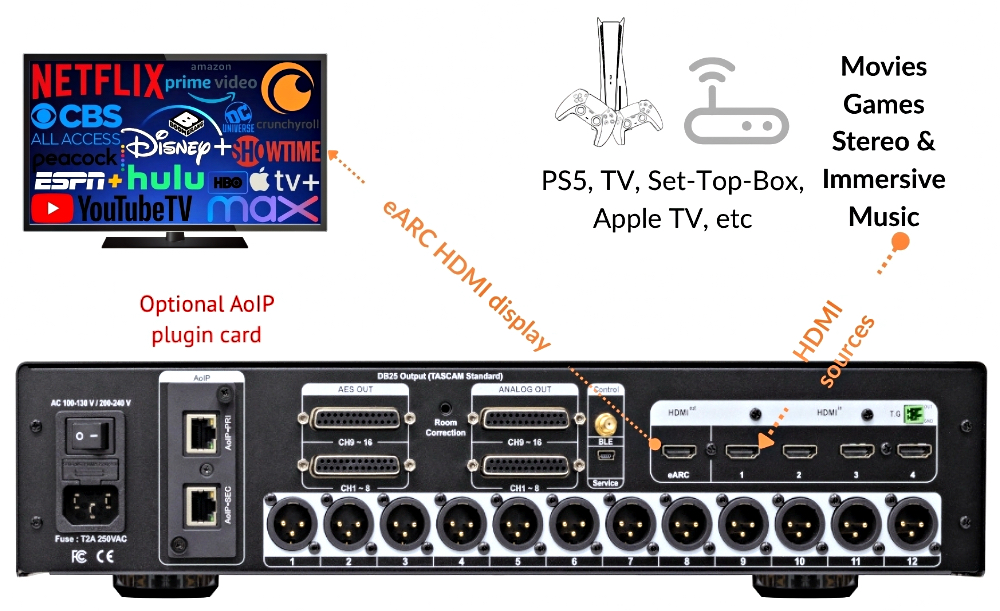
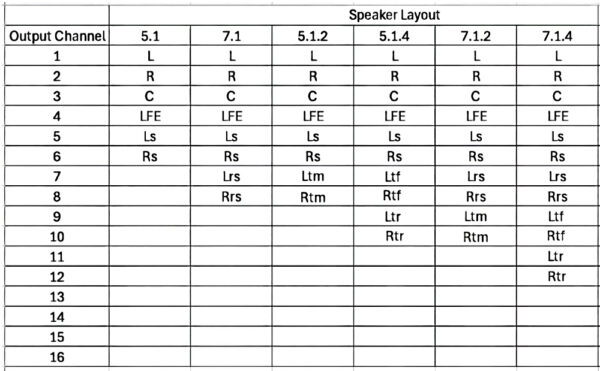
The H16-AVP supports HDMI 2.0, HDCP 2.2 and HDMI eARC. Its published output audio format is fixed at 24-bit/48 kHz. See the H16-AVP product page for full specifications and current firmware guidance.
Speaker layouts and connector capacity do not increase its maximum 7.1.4 Dolby Atmos decoding capability. Additional receivers may reproduce an existing channel where routing permits.
Choose the right cable
- Analog DB25 to XLR: ANA-Core DB25-XLR
- Analog DB25 to RCA: ANA-Core DB25-RCA
- Analog DB25 to DB25: ANA-Core DB25-DB25
- AES3 DB25 to XLR: AES-Core DB25-XLR
- AES3 DB25 to DB25: AES-Core DB25-DB25
Network audio questions
Do I need a router?
A dedicated local audio network can often operate with an Ethernet switch without a router. Follow the endpoint manufacturer’s requirements for addressing, clocking and switch configuration. A router may still be needed for internet services or communication between networks.
Does the controller computer need to stay on?
For hardware-to-hardware Dante routing, subscriptions are normally retained by the endpoints after configuration, so Dante Controller does not need to remain open for playback. A computer providing the audio or running a virtual sound card must remain on. Other systems may have different requirements.
Can I mix different AoIP products?
Confirm protocol compatibility and the operating settings of every device. AES67 support can enable interoperability, but it does not guarantee automatic discovery or routing between all products. Network latency and clock synchronization also depend on the equipment and configuration.
Explore the setup guides
Build the system that fits your life.
Start with your sources, existing equipment and desired speaker layout. Then choose the components and connections that bring them together.
Explore the components Get help planning your system →
When you contact us, include your room size, speakers, source devices and any equipment you want to keep.